The AI office manager for your dental practice.
ChairCommand reads the systems you already use and tells your team exactly what the day needs: which chairs to fill, which patients to confirm, which claims to fix, which plans to follow up on. It drafts the work. Your staff approves it. Your practice runs cleaner, with a lot less scrambling.
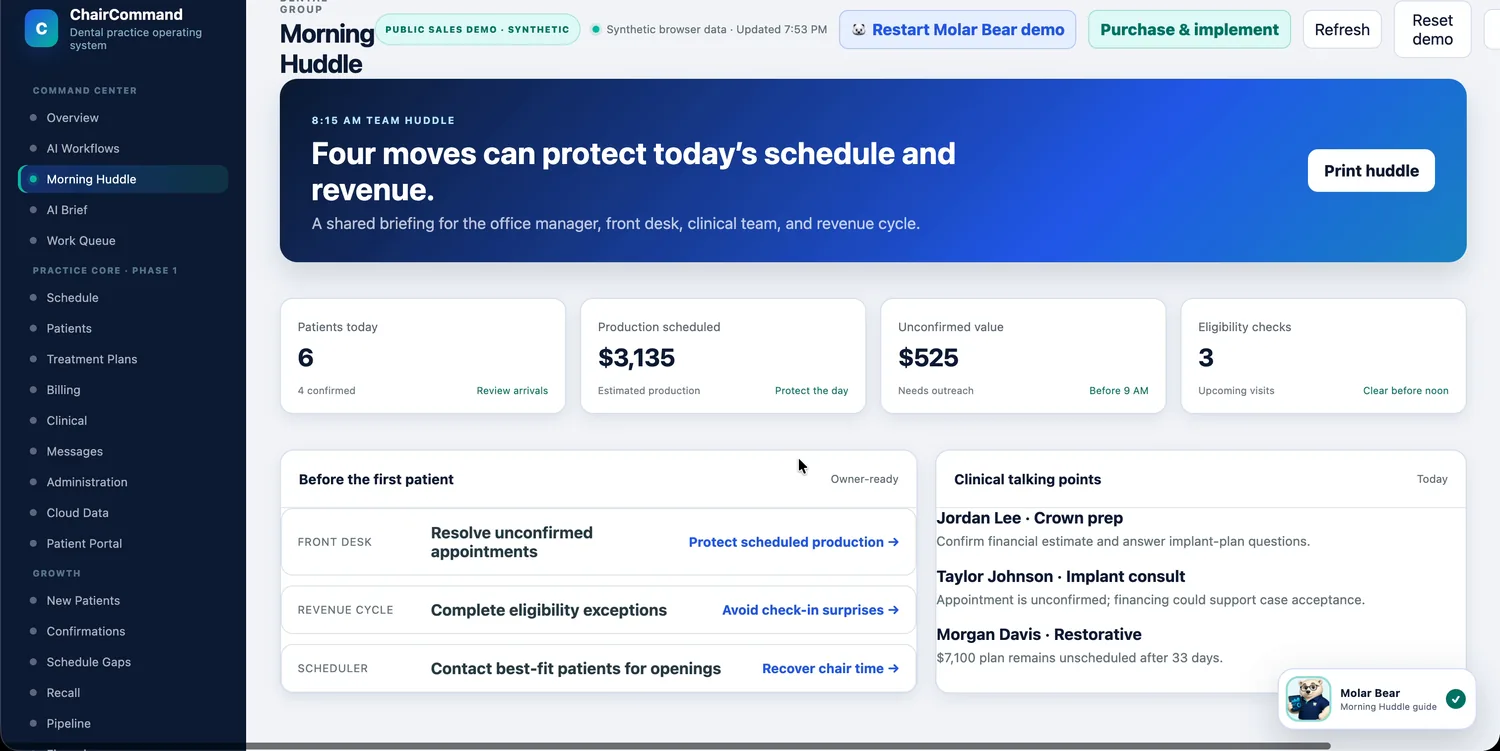
Running a practice shouldn't depend on one person's memory.
The day runs on memory, sticky notes and five screens.
- The morning starts with figuring out what the day needs.
- An empty chair gets noticed once it's already empty.
- Tasks live in someone's head, so they slip when that person is out.
- Claims, plans and recalls get chased when there's time, which is rarely.
The day runs on a plan that's already written for you.
- A morning briefing lays out the day's key moves before the first patient.
- Openings are matched to the patients who fit, with the outreach drafted.
- Every task has a reason, an owner and a status the whole team can see.
- Follow-ups arrive in one ranked queue, so the important ones get done first.
Six reasons your team will want it.
Some practices come for a fuller schedule. Some come for a calmer front desk. Most stay for the way it makes the whole day easier to run.
Fill more chairs
Open time gets matched to the patients most likely to take it, and the outreach is drafted for you.
See schedule gap recovery →Run a smoother day
Providers, chairs, confirmations and exceptions in one color-coded workspace, with a huddle that writes itself.
See the schedule →Always know what's next
One ranked to-do list for the whole team, with an owner and a reason on every item.
See the work queue →Cut the busywork
AI drafts the messages, hand-offs and checklists. Your team reviews and approves in seconds.
See AI workflows →Catch problems early
Unconfirmed visits, eligibility gaps, incomplete claims and medical alerts surface while they're still easy to fix.
See early warnings →Keep every office on track
Goals, scorecards and daily checklists for each location, so "how are we doing?" has a real answer.
See group scorecards →And the revenue follows. Treatment plans get followed up, claims get fixed, balances get collected, and every recovered dollar is logged, so you can see exactly what the work was worth.
Meet the AI assistants working your queue.
Every recommendation shows its reason, its source records and a confidence score. Nothing goes out to a patient or a payer until your staff approves it.
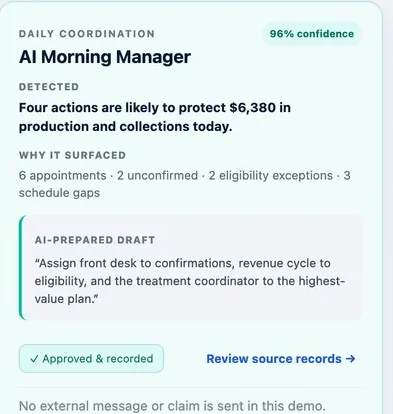
Your day, prioritized before it starts.
Each morning, the AI Morning Manager reviews appointments, confirmations and eligibility exceptions, then proposes who should handle what: front desk on confirmations, revenue cycle on eligibility, the treatment coordinator on the highest-value plan.
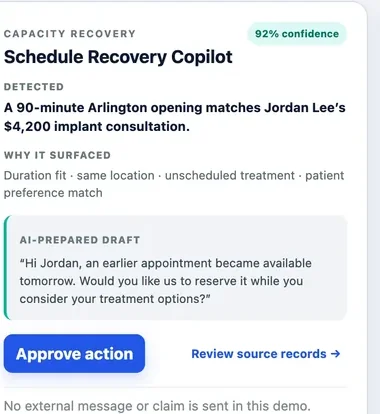
An opening and a match, found in the same moment.
When a 90-minute opening appears, the Schedule Recovery Copilot checks it against unscheduled treatment by duration, location and patient preference, then drafts the message inviting that patient to move up.
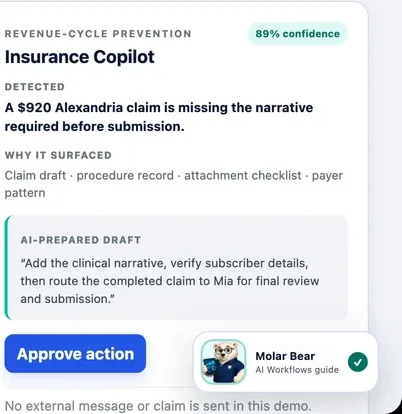
Spot the gap before the payer does.
Before a claim goes out, the Insurance Copilot checks it against the procedure record, the attachment checklist and what each payer usually needs. When something is missing, like a required narrative, it explains why and drafts the hand-off to the right person.
What it looks like from 8 AM to close.
The plan is already there.
The Morning Manager lays out who's coming, who hasn't confirmed, which eligibility checks are open, and who on the team should take each one.
The chair doesn't sit empty.
ChairCommand flags the opening, finds the patients whose treatment fits, and drafts the message. Your front desk reviews and approves it.
The problem is caught early.
A claim is missing a required narrative. It's flagged before submission and routed to the right person, instead of coming back weeks later.
Tomorrow starts ahead.
The brief shows what changed since yesterday, what got done and what carries over, so nobody has to reconstruct the day from memory.
Built for the whole team, not just the manager.
Each person gets the view that fits their job, and a different reason to be glad it's there.
Owners
See how the practice is doing before your first patient, without living in the reports.
The owner view →Dentists
Walk into each day prepared: alerts up front, a clear schedule, treatment ready to present.
The dentist view →Office managers
A to-do list written for you every morning, with the team's work already assigned.
The office manager view →Front desk
Know exactly who to call and what to say, in the order that matters most.
The front desk view →Revenue cycle
Catch the claim, the eligibility gap or the balance before it becomes a problem.
The revenue cycle view →Operations
Hold every location to the same standard, with a daily scorecard for each office.
The operations view →Built to connect to the system you already have open.
ChairCommand is an add-on layer, not a replacement. It's designed to read from your PMS through its API so nothing about your day-to-day charting or scheduling changes.